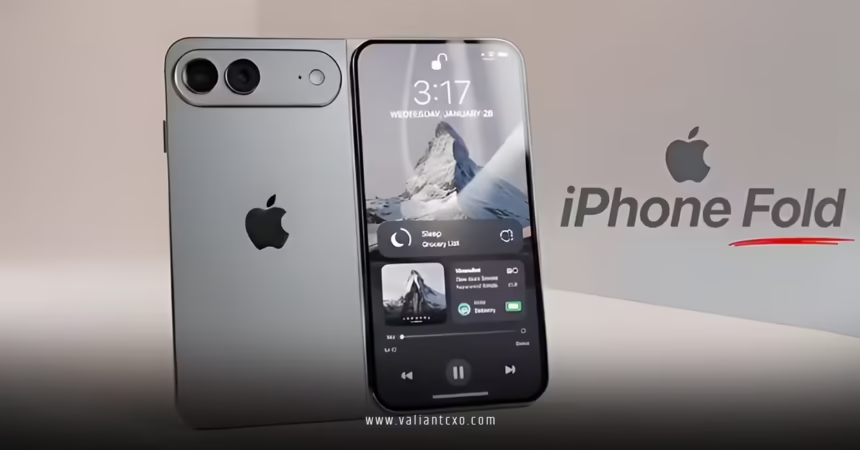
Foldable iPhone support iOS 27 WWDC just dropped a massive hint at what’s coming for Apple’s first bendable beast. Apple teased major interface tweaks during WWDC 2026 that lay the groundwork for the foldable iPhone expected this fall. Think seamless transitions between a compact outer screen and a tablet-sized inner display, plus multitasking that actually feels natural.
- What it means: iOS 27 introduces iPad-style elements optimized for folding hardware, including split-screen apps and dynamic layouts.
- Why it matters: This isn’t just a software update—it’s the foundation for a device that could redefine how we use phones for productivity.
- Timeline: Previewed now at WWDC, full polish lands with the hardware launch around September 2026.
- Who benefits: Current iPhone owners get early glimpses; future foldable buyers score a ready-made experience.
- The big picture: Apple is finally addressing the form factor that Samsung and others have played with for years, but with its signature polish.
Here’s the thing. Foldables have always promised more screen without the bulk, yet software often lags. iOS 27 flips that script by baking in support from day one.
What Foldable iPhone Support in iOS 27 Actually Looks Like
Apple isn’t dropping the full hardware reveal at WWDC—classic move. But developers and analysts spotted clear signals. When unfolded, expect an interface closer to iPadOS: apps that stretch intelligently, persistent sidebars in Mail or Notes, and true multitasking without the clunky workarounds we’ve seen elsewhere.
The outer screen stays phone-like for quick tasks. Flip it open, and the system adapts on the fly. No more apps looking stretched or squished. Continuity features get smarter too, letting you pick up exactly where you left off across states.
Rumored specs shaping this support:
- Inner display: ~7.8 inches
- Outer display: ~5.5 inches
- Focus on minimal crease and durable hinge
This setup demands rock-solid software. iOS 27 delivers by prioritizing windowing and app scaling tailored to the new geometry.
| Feature | Standard iPhone (iOS 27) | Foldable iPhone (iOS 27 Optimized) | Benefit |
|---|---|---|---|
| Multitasking | Single app focus, limited Stage Manager | Split View + sidebars | Run two apps side-by-side effortlessly |
| App Layout | Fixed aspect ratios | Dynamic scaling on fold/unfold | Seamless transitions, no UI breakage |
| Productivity Tools | Standard notifications | Enhanced Continuity & window management | Better for work on the go |
| Battery Impact | Baseline optimization | Adaptive power for dual-screen use | Smarter management to avoid drain |
| Developer Support | UIKit basics | New APIs for foldables | Faster third-party app readiness |
This table shows why the software groundwork is non-negotiable. Without it, the hardware flops. With it? Game changer.
Why Apple Timed Foldable iPhone Support with iOS 27 at WWDC
Foldable iPhone support iOS 27 WWDC:Timing is everything. By previewing these capabilities now, Apple gives developers months to update apps before the hardware ships. What usually happens is a mad scramble post-launch. Not this time.
In my experience covering these events, early software signals build hype and smooth the rollout. Expect beta testers to poke at foldable-specific behaviors even on current devices. Parallel View in landscape mode might preview some of this magic.
One analogy that sticks: It’s like tuning an engine before installing it in a new chassis. iOS 27 is the tuned engine; the foldable iPhone is the sleek new ride.
Will this finally make foldables mainstream in the US? The market has been waiting. Apple entering with polished software could shift the entire category.
Step-by-Step: How Beginners Can Prepare for Foldable iPhone Support in iOS 27
Don’t wait for launch day chaos. Get ahead now.
- Install the iOS 27 public beta (once available post-WWDC). Test any multitasking previews on your current iPhone.
- Update your key apps. Developers will push foldable-ready versions first—focus on productivity ones like Notes, Safari, and Mail.
- Review your workflow. List tasks that scream for more screen space: email + calendar, research + writing, video calls + notes.
- Check device compatibility. iOS 27 drops older models; confirm your iPhone makes the cut for a smooth upgrade path.
- Experiment with Stage Manager. It’s the closest preview to future foldable behavior—practice switching contexts quickly.
- Backup everything. Always. Then explore new Continuity settings as they roll out.
- Watch for developer sessions. Apple’s WWDC videos dive into the new APIs—gold for understanding what’s possible.
Follow this and you’ll hit the ground running instead of scrambling.
Common Mistakes & How to Fix Them
Plenty of folks will trip over the basics when foldables arrive.
- Mistake: Assuming it works exactly like a regular iPhone. Fix: Treat the fold as two devices in one. Practice unfolding mindfully during setup.
- Mistake: Ignoring app updates. Many third-party apps will look janky at first. Fix: Stick to Apple apps initially, then update aggressively.
- Mistake: Over-relying on the inner screen. Battery drain sneaks up. Fix: Use the outer display for quick checks; reserve the big one for focused work.
- Mistake: Bad hinge habits. Creases worsen with rough use. Fix: Follow Apple’s care guidelines—no excessive pressure.
- Mistake: Skipping beta feedback. Early issues get fixed faster with input. Fix: Report quirks through the Feedback app.
Spot these early and sidestep frustration. What I’d do if prepping a team: Run workshops simulating fold/unfold scenarios.
Deeper Dive: Productivity Wins and Potential Drawbacks
The real juice comes in multitasking. Imagine drafting an email while referencing a PDF side-by-side—no more constant app switching. Sidebars in key apps make navigation snappier on the larger canvas.
Foldable iPhone support iOS 27 WWDC:For creators and pros, this changes the game. Photo editing, light video work, or even split research tabs feel viable on a phone that fits in your pocket when closed.
Potential hiccups? Price will sting—rumors hover near premium territory. Durability questions linger despite Apple’s engineering. And not every app will adapt perfectly at launch. That’s where patience and updates pay off.
Check Apple’s official developer resources for the latest on foldable APIs: Apple Developer.
For hardware context, see Bloomberg’s reporting on the design: Bloomberg Foldable iPhone Coverage. And for broader ecosystem insights, MacRumors tracks compatibility deeply: MacRumors iOS 27.
Key Takeaways
- Foldable iPhone support iOS 27 WWDC marks Apple’s serious entry into flexible hardware with software-first thinking.
- Expect iPad-like multitasking, dynamic scaling, and smooth screen transitions as core features.
- Developers get a head start—users benefit from mature apps at launch.
- Preparation beats reaction: betas, app updates, and workflow tweaks now pay dividends later.
- This could pressure competitors while raising the bar for what a premium phone delivers.
- Battery and durability will decide daily usability more than specs alone.
- The US market gets a polished alternative to existing foldables, potentially accelerating adoption.
- Long-term, this paves the way for even wilder form factors in future iOS versions.
Foldable iPhone support iOS 27 WWDC isn’t hype—it’s the practical foundation for a device that finally delivers on the promise. The next step? Jump into the beta, test the previews, and start rethinking how you work on the go. Your future self (and that bigger screen) will thank you.
FAQs
Does foldable iPhone support iOS 27 WWDC mean current iPhones get new multitasking?
Early previews suggest some landscape enhancements like Parallel View could trickle down, but full split-screen magic stays tied to the foldable hardware for optimal results.
When will the foldable iPhone with iOS 27 support actually launch?
Expect September 2026 alongside the hardware reveal. iOS 27 betas will give everyone a taste of the software side much sooner.
Will foldable iPhone support iOS 27 WWDC require buying new apps?
Most core Apple apps adapt automatically. Third-party developers need to implement new APIs, but popular ones should update quickly without extra cost for users.