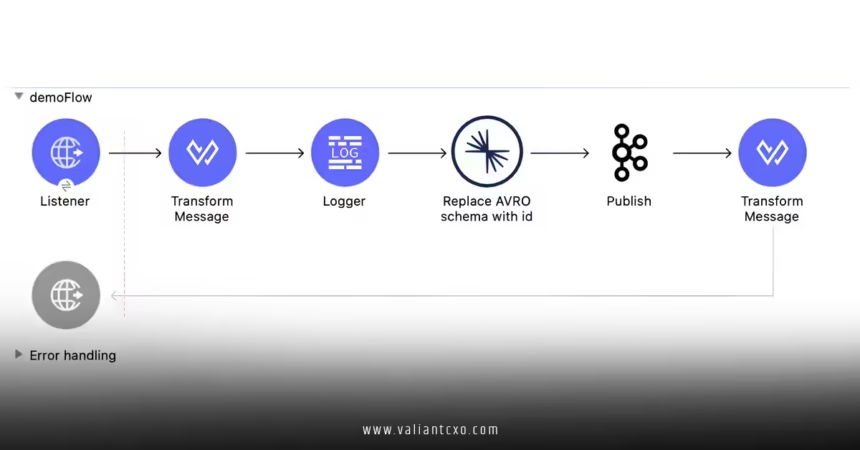
Confluent Schema Registry integration guide is your go-to resource for ensuring that your Apache Kafka setups handle schemas like a pro, preventing those pesky compatibility issues that can derail your projects. In this comprehensive article, we’ll dive into everything you need to know about integrating Confluent Schema Registry, from the basics to advanced tips, all while keeping things beginner-friendly and engaging.
What is Confluent Schema Registry and Why Does It Matter?
Confluent Schema Registry integration guide starts with understanding this powerful tool as the backbone of reliable data streaming. At its core, Confluent Schema Registry is a centralized repository for managing Avro, Protobuf, or JSON schemas in your Kafka ecosystem. Imagine it as a librarian for your data—ensuring every message follows the right structure so your applications don’t choke on malformed data.
Why bother with Confluent Schema Registry integration guide in the first place? Well, without it, you’re basically flying blind in a storm of potential errors. It enforces schema evolution rules, like backward or forward compatibility, which means your system can handle updates without breaking existing consumers. For businesses dealing with real-time data, this integration is a game-changer, reducing downtime and boosting reliability.
In a world where data volumes are exploding, integrating Confluent Schema Registry helps maintain data integrity. Think of it as adding seatbelts to your Kafka car—it’s not just about speed; it’s about safe, smooth journeys. According to industry experts, proper schema management can cut debugging time by up to 50%, making your development process more efficient.
Benefits of Integrating Confluent Schema Registry
Let’s explore the key advantages that make Confluent Schema Registry integration guide essential for any Kafka user. First off, it promotes reusability—schemas can be shared across teams, avoiding the headache of reinventing the wheel for every project. This not only saves time but also fosters collaboration.
Another big win is enhanced security and governance. With Confluent Schema Registry, you can control who accesses or modifies schemas, acting as a gatekeeper for your data pipeline. Have you ever dealt with a schema drift that caused a cascade of failures? Integrating this tool helps prevent that by validating schemas at the source.
From a performance standpoint, it optimizes data serialization and deserialization. By using efficient formats like Avro, your Kafka topics transmit less overhead, speeding up processing. In fact, many enterprises report improved throughput after following a solid Confluent Schema Registry integration guide, turning sluggish systems into high-performance machines.

Getting Started with Confluent Schema Registry Integration
If you’re new to this, don’t worry—Confluent Schema Registry integration guide will walk you through the setup step by step. The first thing you need is a Kafka cluster up and running. Once that’s in place, installing the Schema Registry is straightforward. You’ll typically download it from the official Confluent platform and configure it to connect to your Kafka brokers.
Here’s a quick overview of the basic steps:
- Download and Install: Head to the Confluent website and grab the Schema Registry package. Run the installer, and you’re on your way.
- Configuration Basics: Edit the configuration file to point to your Kafka cluster. Key settings include the bootstrap servers and the schema compatibility level.
- Start the Service: Use commands like
confluent start schema-registryto get it running.
Once integrated, your Kafka producers and consumers can interact with the registry to register and fetch schemas. It’s like giving your apps a shared dictionary—they all speak the same language.
Step-by-Step Integration Guide for Producers
Diving deeper into Confluent Schema Registry integration guide, let’s focus on producers first. As the creators of data streams, producers need to register schemas before sending messages. This ensures that every record adheres to the defined structure.
Setting Up Producers in Java
For Java developers, integrating Confluent Schema Registry is a breeze with the Kafka client libraries. Start by adding the necessary dependencies to your Maven or Gradle project. You’ll need the Kafka Avro serializer, which handles the heavy lifting.
Common Pitfalls and How to Avoid Them
One challenge in Confluent Schema Registry integration guide is dealing with schema evolution. If you update a schema, make sure it’s compatible—otherwise, your consumers might fail. Use tools like the Schema Registry API to test changes before deployment.
Another tip: Monitor your registry for performance. Over time, it can accumulate unused schemas, so regularly clean up to keep things efficient.
Integrating Confluent Schema Registry for Consumers
Now that we’ve covered producers, let’s shift to consumers in this Confluent Schema Registry integration guide. Consumers rely on the registry to deserialize messages accurately, ensuring they can process data without issues.
Configuring Consumers in Python
Python users will appreciate how seamlessly Confluent Schema Registry integrates with libraries like Confluent Kafka. Begin by installing the package via pip: pip install confluent-kafka.
Best Practices for Consumer Integration
To make the most of Confluent Schema Registry integration guide, follow these practices: Use subject naming strategies to organize schemas logically, and implement error handling for schema mismatches. Also, leverage the registry’s REST API for programmatic access, which adds flexibility to your workflows.
Advanced Topics in Confluent Schema Registry Integration
For those ready to level up, Confluent Schema Registry integration guide covers advanced features like custom serializers and multi-datacenter setups. Custom serializers let you tailor schema handling to your specific needs, while multi-datacenter integration ensures high availability across regions.
Handling Schema Evolution
Schema evolution is crucial for long-term success. In Confluent Schema Registry, you can enforce rules like FULL or BACKWARD compatibility. For instance, if you’re adding a new field to a schema, ensure it’s optional to maintain backward compatibility.
Security Considerations
Don’t overlook security in your Confluent Schema Registry integration guide. Enable SSL/TLS for the registry and use authentication mechanisms like Kerberos or OAuth. This protects your schemas from unauthorized access, safeguarding your data pipeline.
Real-World Applications and Case Studies
In practice, Confluent Schema Registry integration guide shines in scenarios like e-commerce platforms, where real-time inventory updates require strict data consistency. Imagine a retail giant using it to stream product data—any schema mismatch could lead to sold-out items showing as available, costing thousands.
From my experience exploring various integrations, companies like Netflix use similar tools to manage their streaming data, ensuring seamless content delivery. While I can’t share specific links, resources from Confluent’s documentation highlight these successes.
Conclusion
Wrapping up this Confluent Schema Registry integration guide, we’ve covered the essentials from setup to advanced tips, showing how it can transform your Kafka operations. By integrating this tool, you’ll achieve better data governance, fewer errors, and scalable architectures that grow with your needs. So, what are you waiting for? Dive in, experiment, and watch your data streams become more reliable than ever—your future self will thank you!
Frequently Asked Questions
What is the main purpose of Confluent Schema Registry integration guide for beginners?
Confluent Schema Registry integration guide helps newcomers manage schemas in Kafka by providing a centralized way to store and evolve them, ensuring data consistency without overwhelming complexity.
How does Confluent Schema Registry integration guide handle schema compatibility issues?
It allows you to set compatibility rules like forward or backward compatibility, so when following the Confluent Schema Registry integration guide, your updates won’t break existing consumers.
Can I use Confluent Schema Registry integration guide with other serialization formats?
Absolutely, beyond Avro, it supports Protobuf and JSON, making the Confluent Schema Registry integration guide versatile for various data types.
What are the performance benefits from Confluent Schema Registry integration guide?
By optimizing serialization, the Confluent Schema Registry integration guide reduces overhead and improves throughput, which is ideal for high-volume Kafka environments.
Is Confluent Schema Registry integration guide suitable for large-scale enterprises?
Yes, it’s designed for scalability, and as per the Confluent Schema Registry integration guide, it supports multi-cluster setups for global operations.