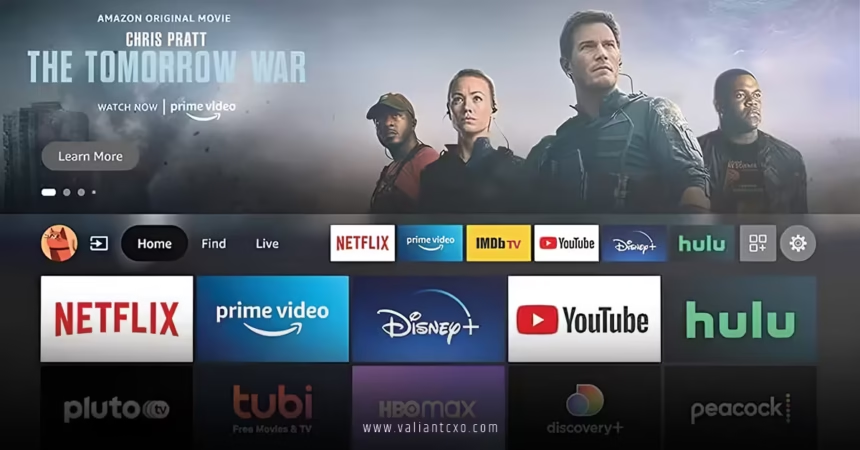
Fire TV 2026 UI redesign has arrived, and it’s shaking up how millions navigate their streaming world. Announced at CES 2026 and now rolling out in phases (starting in the US on select devices like the Fire TV Stick 4K Max and Omni series), this major overhaul feels like Amazon finally listened to years of feedback. Gone are the cluttered rows and sluggish scrolling—replaced by a cleaner, snappier interface that puts content front and center. If you’ve ever spent frustrating minutes hunting for the right app or show, this update might just cut that time in half.
Why does this matter? Streaming isn’t just about what you watch anymore; it’s about how quickly and intuitively you get there. The Fire TV 2026 UI redesign tackles exactly that, blending modern aesthetics with practical speed boosts.
What Sparked the Fire TV 2026 UI Redesign?
Amazon didn’t wake up one day and decide to tweak pixels. Users have complained for years about the old interface feeling dated—especially compared to slick competitors like Google TV. With Alexa+ usage skyrocketing (over 2.5 times more interactions), Amazon saw the chance to modernize the entire experience.
The goal? Make Fire TV “cleaner, faster, and better organized.” They rebuilt parts of the underlying code for noticeable performance gains—up to 20-30% faster navigation and loading. It’s the biggest visual and functional refresh since 2020, and honestly, it was overdue.
Key Visual Changes in the Fire TV 2026 UI Redesign
The moment you power on your Fire TV, you’ll notice the difference. The layout feels airy and premium.
Rounded corners soften every element, from hero banners to app tiles. Color gradients are subtler and more varied—no more harsh blocks of color overwhelming the screen. Typography is consistent and easier to read at a glance, while extra spacing between rows prevents that cramped feeling.
It’s like Amazon gave the interface a deep breath. Everything breathes easier, making late-night browsing less eye-straining.
Navigation Overhaul: Top Bar Takes Center Stage
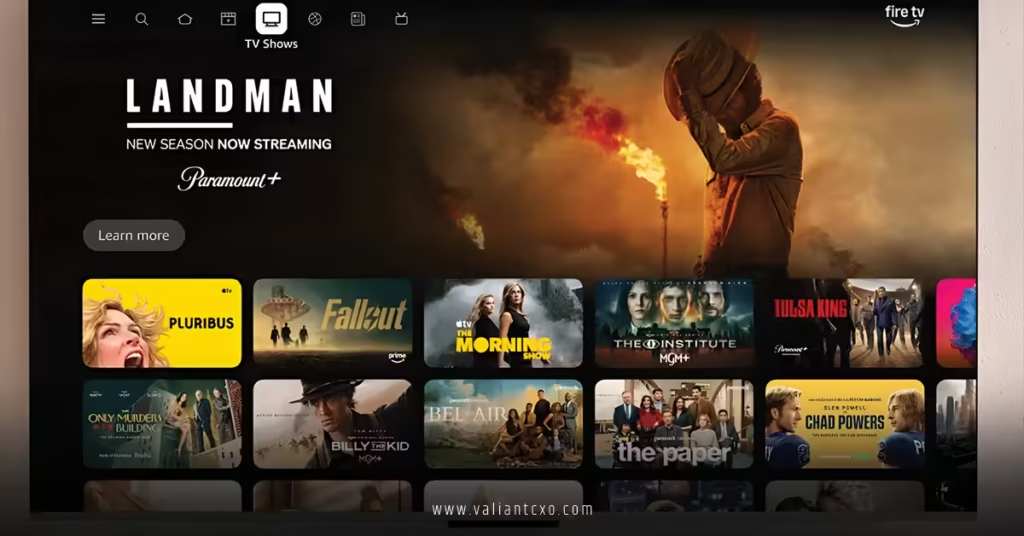
One of the boldest moves? Moving the main navigation to a persistent top bar.
You get clear tabs: Home, Movies, TV Shows, Sports, News, Live TV, and more. Search sits prominently up there too—no more digging through menus. This setup echoes Google TV’s approach but keeps Amazon’s Prime-focused flavor.
Press and hold the Home button on your remote for a quick shortcut panel—access display settings, audio tweaks, or other essentials instantly. It’s small, but it saves real clicks.
Expanded App Pinning: From 6 to 20 Favorites
Remember pinning just six apps on the home screen? That limit frustrated everyone with a dozen services.
The Fire TV 2026 UI redesign bumps it to 20. Smaller icons allow more visibility without clutter. Scroll horizontally to see your Netflix, Disney+, Prime Video, YouTube, Hulu—the works—right there.
No more full-screen app grid anymore. Apps live in that extended row or tucked into a side menu for less-used ones like Games or the Appstore. It’s a trade-off: faster access to favorites, but discovering new apps requires a bit more effort.
Smarter Content Discovery and Personalization
The home screen now emphasizes “For You” rows pulling recommendations from all your apps—not just Prime. Browse Movies? See titles across platforms. Same for TV shows or Live TV.
Dedicated sections for sports, news, and live channels centralize everything. Hero images dominate the top for featured content, drawing you in immediately.
Alexa+ integration shines brighter too—conversational voice search feels more natural. Ask complex questions, and get precise results faster.
Performance Boosts You’ll Actually Feel
Amazon rebuilt code for efficiency. Navigation zips, menus load quicker, and scrolling feels buttery. On older hardware, the difference might be subtle, but on newer sticks like the 4K Max, it’s night and day.
Less time buffering through menus means more time actually watching. That’s the real win.
How the Fire TV 2026 UI Redesign Pairs with Mobile App Enhancements
The redesign doesn’t stop at the TV. Amazon synced it with a revamped Fire TV mobile app—turning your phone into a true second-screen powerhouse.
Browse full content libraries, manage watchlists remotely, launch playback directly from your device—all while the interface matches the new TV look perfectly. For deeper details on these mobile perks, check out our guide to Fire TV mobile app second screen features 2026. It complements the UI refresh beautifully.
Who’s Getting the Fire TV 2026 UI Redesign and When?
Rollout started in February 2026 for US users on select models: Fire TV Stick 4K Plus, Fire TV Stick 4K Max (2nd Gen), and Fire TV Omni Mini-LED TVs.
Broader rollout hits more devices and countries this spring. If your device hasn’t updated yet, check Settings > My Fire TV > About > Check for Updates. It’s automatic and free—no action needed beyond patience.
Any Drawbacks to the Fire TV 2026 UI Redesign?
Perfection doesn’t exist. Some miss the old app grid for quick overviews of everything installed. Ads still appear (it’s Amazon, after all). On very old hardware, speed gains might feel minimal.
But overall? The pros outweigh the cons. It feels fresher, more competitive, and genuinely user-focused.
The Bigger Picture: Where Fire TV Heads Next
This redesign positions Fire TV as a true content hub—not just a Prime launcher. With deeper cross-app discovery, smarter AI, and seamless mobile integration, Amazon’s betting big on convenience.
Expect refinements in future updates—maybe even more personalization or smart home ties. For now, though, the Fire TV 2026 UI redesign delivers exactly what long-time users wanted: simplicity without losing power.
Ready to experience it? Update your device and dive in. Your next streaming session will feel noticeably smoother.
In summary, the Fire TV 2026 UI redesign brings modern visuals, faster performance, expanded customization, and smarter discovery—all wrapped in a cleaner package. It reduces decision fatigue so you spend less time browsing and more time enjoying. Grab the update when it hits your device—you won’t look back.
For official details, visit the About Amazon announcement on Fire TV upgrades. See in-depth analysis at AFTVnews full overview. Read more on rollout from TechCrunch coverage.
FAQs About Fire TV 2026 UI Redesign
What devices get the Fire TV 2026 UI redesign first?
It started with Fire TV Stick 4K Plus, Fire TV Stick 4K Max (2nd Gen), and Fire TV Omni Mini-LED series in the US, with wider rollout planned for spring 2026.
How much faster is the Fire TV 2026 UI redesign?
Amazon claims 20-30% speed improvements in navigation and loading thanks to rebuilt code—many users report noticeably snappier performance.
Does the Fire TV 2026 UI redesign remove the app grid?
Yes, the full-screen app grid is gone. Apps now appear in an extended horizontal row (up to 20 pinned) or a side menu.
Can I link the Fire TV 2026 UI redesign with the mobile app?
Absolutely—the updated mobile app mirrors the new TV interface, adding second-screen tools like remote browsing and playback launch.
Is the Fire TV 2026 UI redesign available outside the US yet?
Not fully—initial rollout targets the US, but Amazon plans expansion to more countries and devices throughout spring 2026.