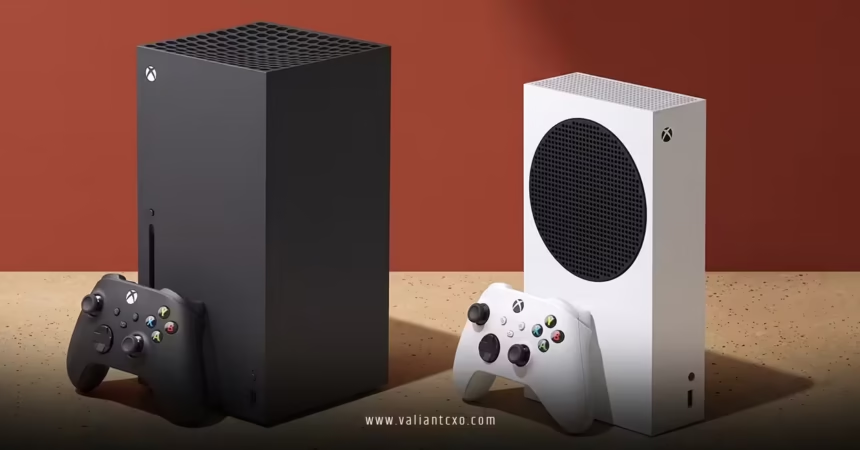
Xbox Series X vs Series S Buying Guide :
Trying to decide between Xbox Series X and Xbox Series S? You’re not alone.
Both consoles run the same games. Both plug into the same ecosystem. But they play very different roles in your setup and your wallet.
If you’re also curious about long-term collector stuff like the Xbox Series X25 limited edition translucent green console release date, you still need to pick the right Xbox for right now. This guide breaks it down in plain language so you don’t overpay, underbuy, or get stuck with the wrong box.
Quick overview: Xbox Series X vs Series S at a glance
Here’s the headline:
- Xbox Series X = best performance, true 4K, disc drive, bigger storage, “main rig” energy.
- Xbox Series S = cheaper, digital-only, 1440p-focused, smaller storage, perfect for casual or secondary setups.
Fast comparison table
| Feature | Xbox Series X | Xbox Series S | Best For |
|---|---|---|---|
| Target Resolution | Native 4K up to 120 fps (where supported) | Up to 1440p (upscaled to 4K), 120 fps in some titles | Series X: 4K TVs & visuals snobs Series S: 1080p / budget 4K setups |
| Storage (internal) | 1 TB SSD (usable space slightly less) | 512 GB SSD (less usable space) | Series X: Bigger libraries Series S: Lighter users |
| Disc Drive | Yes (4K UHD Blu-ray) | No (all-digital) | Series X: Disc collectors & used games Series S: Digital-only gamers |
| Physical Size | Larger, tower-style | Smaller, more compact | Series X: Main living room Series S: Bedrooms/offices/dorms |
| Performance | More powerful GPU & higher resolutions | Less powerful GPU, still fast SSD | Series X: Hardcore & enthusiasts Series S: Casual & Game Pass users |
| Price Tier | Higher | Lower | Series X: If budget allows Series S: If you’re price-sensitive |
The core question: What kind of player are you?
Before getting lost in specs, answer this honestly:
- Do you own a 4K TV or monitor and actually care about pixel-level detail?
- Do you buy disc-based games, watch Blu-rays, or collect physical media?
- Do you plan to stay on Xbox for several years, playing big AAA titles on day one?
If you answered “yes” to most of those, lean hard toward Xbox Series X.
If your answers are more like:
- “I just want affordable next-gen access.”
- “I live on Xbox Game Pass.”
- “I’ve got a 1080p TV and don’t care much about discs.”
Then the Xbox Series S is probably your sweet spot.
Xbox Series X: Who it’s for and why it’s worth it
Think of the Xbox Series X as the “flagship PC build” of the console world. It’s built for people who want:
- Stable high resolutions (4K)
- Higher frame rates in supported titles
- More storage
- Physical media support
Pros of Xbox Series X
- True 4K experience: If you’ve got a decent 4K TV or gaming monitor, this is where the Series X flexes. Games can look sharper, cleaner, and more detailed.
- Disc drive: Great if you:
- Own older Xbox One discs you want to keep using (where compatible).
- Like buying games on sale physically.
- Watch movies on 4K UHD Blu-ray.
- More internal storage: 1 TB goes a lot further when games often weigh in at 80–120 GB.
- Better long-term headroom: In my experience, higher-end hardware ages more gracefully as games get heavier over the years.
Who should prioritize Series X?
- Players with a 4K TV and a living room setup that’s not going anywhere.
- Gamers who buy a lot of AAA titles and want them looking and running as well as possible on console.
- Anyone who treats their console like a main entertainment hub: games, streaming, Blu-rays.
If you’re the kind of person who also keeps tabs on potential special editions or future hardware—like people tracking any whispers around an Xbox Series X25 limited edition translucent green console release date—Series X is closer to that “collector-grade” baseline: more premium, more future-proof, more “centerpiece of the setup.”
Xbox Series S: Who it’s for and why it still makes sense
The Series S is deceptively powerful and massively underrated. It’s not a toy; it’s a lean, digital-first box designed for:
- Game Pass players
- Secondary rooms
- Budget-conscious buyers
- Non-4K setups
Pros of Xbox Series S
- Lower entry price: Lets you into the current Xbox generation for less cash.
- Compact size: Easy to fit in small spaces, dorms, bedrooms, or a travel setup.
- Digital-only simplicity: No discs to store, no clutter—everything is in your account library.
- Good enough visuals for 1080p / 1440p: You still get fast load times and next-gen features, just with lower native resolution in many cases.
The big trade-offs
- No disc drive:
- You can’t play physical games or movies.
- If you own a bunch of discs, Series S is not ideal as your only console.
- Half the internal storage:
- 512 GB fills up fast with modern titles.
- Plan on managing your library more aggressively or budgeting for storage expansion.
Who should prioritize Series S?
- Newer players just getting into Xbox.
- Households where the main “fancy” setup is elsewhere and you need a second console.
- Anyone on a tighter budget who still wants access to Xbox Game Pass and current-gen games.
If you mainly care about playing rather than collecting or squeezing every pixel out of a 4K panel, Series S gets the job done and then some.
Storage, Game Pass, and your library: The real deciding factors
Resolution gets all the attention, but here’s what actually affects your day-to-day experience:
Storage reality check
- Series X (1 TB) = more games installed at once, less juggling.
- Series S (512 GB) = you’ll be uninstalling and reinstalling more often.
If you plan on living in Xbox Game Pass, both consoles benefit from:
- External storage for last-gen titles.
- Official storage expansion cards if you want more ultra-fast SSD space.
Game Pass magnifies value on both
Game Pass turns both Series X and Series S into serious value machines. You’re getting:
- Day-one first-party games
- A rotating catalog of indies, AAAs, and classics
- Cloud gaming options in many regions
From a pure value perspective:
- Series X + Game Pass = premium experience.
- Series S + Game Pass = budget powerhouse.
The right combo comes down to budget and display. Series S with Game Pass on a 1080p TV is honestly one of the best value setups in gaming.
Discs vs digital-only: Make this decision early
One of the biggest practical differences between Series X and Series S is discs.
Go Series X if:
- You already own a stack of Xbox One / Xbox 360 discs and want to keep using them (where supported).
- You like:
- Trading or selling used games.
- Buying physical titles on sale.
- Watching Blu-ray and 4K movies.
Go Series S if:
- You’re fine going all-digital—no physical collection, no used games.
- Your library is mostly:
- Game Pass
- Digital purchases
- Cloud gaming
Switching from digital to disc later is easy (you can always add a Series X). Going the other way—buying discs then realizing your console can’t use them—is a headache.
How your TV or monitor changes the choice
Your display matters more than most people think.
If you own a 4K HDR TV or 4K gaming monitor
- Series X is the logical pick.
- You’re leaving a lot on the table if you buy a cheaper console and then don’t take advantage of that display hardware.
If you’re on 1080p or a budget display
- Series S suddenly makes more sense.
- You won’t see the full benefit of Series X’s extra power on a lower-res screen.
- The money saved can go into:
- A better headset
- Game Pass Ultimate
- Or future upgrades
In my experience, the happiest buyers match their console to their display tier first, then worry about everything else.
Step-by-step buying plan for beginners
Feel overwhelmed? Here’s a simple path to follow.
Step 1: Check your display
- If you have a solid 4K HDR TV or monitor and care about visuals → lean toward Series X.
- If you’re on 1080p or don’t care much about ultra-sharp image quality → Series S is perfectly fine.
Step 2: Decide discs vs digital
- Want discs, used games, or Blu-rays? → Series X only.
- Comfortable living 100% digital? → either works, but Series S is more budget-friendly.
Step 3: Gauge your budget and timeline
- If you can afford it and plan to keep your console for years, Series X is the “buy once, cry once” option.
- If you’re testing the waters, buying for a kid, or building a secondary setup, Series S is often the smarter starting point.
Step 4: Plan storage from day one
- Heavy user or big library → consider Series X plus eventual storage expansion.
- Light user or mostly indie/Game Pass rotation → Series S can work with careful library management.
Thinking ahead: Future consoles & limited editions
A lot of people eye the current Series X vs Series S choice while also wondering about future special hardware. That’s where long-term curiosity like the Xbox Series X25 limited edition translucent green console release date comes in.
Here’s how to think about it strategically:
- Don’t stall your entire gaming life waiting for unannounced hardware.
- Treat a potential future limited edition as:
- A collector upgrade.
- A “sell current console, buy new edition” scenario.
If you love the idea of rare or themed consoles, your best play is:
- Buy the right Xbox for now (X or S, based on your situation).
- Keep your box in good condition (helps resale value later).
- If a truly compelling limited edition shows up one day, decide then whether to upgrade.
That way you’re not stuck on the sidelines while everyone else is enjoying current-gen games.
Common mistakes when choosing between Series X and Series S
Mistake 1: Overpaying for power you can’t see
Buying a Series X while using a small 1080p TV you sit 10 feet away from is… not ideal.
Fix: If you don’t plan to upgrade your display, you might be better off buying a Series S and putting the difference toward a future TV.
Mistake 2: Forgetting about the disc drive
People buy a Series S, then remember their shelf full of discs. Ouch.
Fix: Take 10 minutes and look at your current library. If discs matter even a little, go Series X.
Mistake 3: Underestimating storage needs
You think 512 GB will be fine, then a few big installs later, you’re juggling constantly.
Fix: Either:
- Lean toward Series X if you’re a heavy user, or
- Budget for storage expansion from day one if you pick Series S.
Mistake 4: Waiting forever for unconfirmed “next thing”
Some folks keep saying, “I’ll wait for the next model,” over and over. Meanwhile, they miss an entire generation’s worth of games.
Fix: Buy based on what’s real and available now, not on rumor cycles. If future hardware or special editions appear, upgrade when it actually happens.
Key takeaways
- Series X vs Series S is mostly about: resolution, storage, discs, and budget.
- Xbox Series X is the premium choice for 4K displays, disc users, and long-term performance.
- Xbox Series S is the budget-friendly, digital-only option that’s perfect for Game Pass-focused or secondary setups.
- Your TV/monitor and media habits (disc vs digital) should drive the decision more than hype.
- Plan for storage early—both consoles can benefit from expansion if you install lots of big games.
- Don’t put your entire gaming life on pause while chasing future rumors or waiting for things like an Xbox Series X25 limited edition translucent green console release date to magically appear.
- The smartest move: buy what fits your life now, keep it in good shape, and stay flexible if a future upgrade ever makes real-world sense.
FAQs
1. Is Xbox Series X really that much better than Series S?
Performance-wise, Series X is more powerful, especially for 4K gaming and heavier AAA titles. That said, both consoles run the same games, and on a 1080p or 1440p display, the difference is smaller than you might think for many players.
2. Will I regret going all-digital with the Xbox Series S?
You might, but only if you currently buy discs, trade games, or watch Blu-rays. If you already live in digital stores and Game Pass, you’ll probably be fine. Just go in fully aware that you’re giving up physical media support entirely.
3. If a future special edition console releases, will my Series X or Series S feel obsolete?
Not immediately. New limited editions or even future models don’t suddenly make current consoles useless. In most cases, your best move is to enjoy your Series X or Series S now and, if a future console genuinely excites you—whether it’s a themed variant or something players are watching for like a hypothetical successor tied to an Xbox Series X25 limited edition translucent green console release date—decide later whether to resell and upgrade.