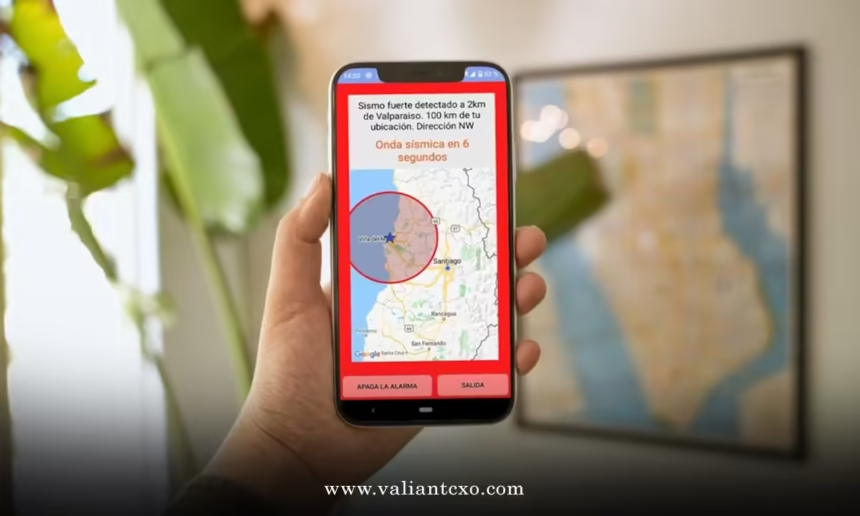
Best earthquake early warning app for android 2026 is the tool you use to get seconds of warning before shaking reaches you, so you can move, protect, or automatically shut things down. Those seconds can mean the difference between “shaken” and “seriously injured.”
Here’s the short version, right up front:
- There’s no single “magic” app, but for most people in the US, ShakeAlert‑powered apps are the practical best choice.
- My top pick for 2026 for most Android users in supported states: a ShakeAlert-based early warning app (typically via your state, carrier, or partner app) plus Google’s built‑in Android Earthquake Alerts.
- These apps work by using USGS ShakeAlert or crowdsourced smartphone sensors to detect quakes fast and push alerts before strong shaking hits.
- To actually benefit, you need to enable alerts, location, and notifications, and know Drop, Cover, Hold On as soon as your phone screams at you.
- In my experience, the real “best earthquake early warning app for android 2026” is a combo of at least two systems so if one misses, the other still gives you a shot.
Let’s break it down like practitioners, not tourists.
What “Best Earthquake Early Warning App for Android 2026” Really Means
When people ask for the best earthquake early warning app for android 2026, they’re usually chasing one thing: reliable seconds of warning before shaking, in a clean, idiot-proof interface that doesn’t spam false alarms.
That boils down to four questions:
- Where are you? (US earthquake early warning is region-specific.)
- Who’s detecting the quake? (Professional seismic networks vs phone sensors.)
- How fast is the alert? (Seconds matter.)
- Can your phone actually push the alert in time? (Settings, battery, permissions.)
In the USA, the backbone for serious alerts is ShakeAlert, a system run by the U.S. Geological Survey (USGS) and state partners along the West Coast. It uses hundreds of seismic stations to detect an earthquake and broadcast warnings within seconds.
Google also runs Android Earthquake Alerts, which uses both official seismic data and crowdsourced phone sensors.
So the “best” here isn’t just about a pretty app. It’s about:
- Data source (USGS/ShakeAlert vs crowdsourced only)
- Coverage (West Coast vs nationwide vs global)
- Latency (how fast you get warned)
- Signal reliability (not waking you up for junk)
Top Picks: Best Earthquake Early Warning App for Android 2026 (USA Focus)
Here’s the kicker: your “best” app stack in 2026 is actually a combo.
#1: ShakeAlert‑Powered Apps (Core Pick for West Coast)
In 2026, if you’re in California, Oregon, or Washington, the best earthquake early warning app for android 2026 is, hands down, anything that taps into USGS ShakeAlert plus your phone’s native alert system.
ShakeAlert is the official early warning system for the West Coast, built on dense seismic networks and run by USGS with state partners. It’s designed to give anywhere from a few seconds to tens of seconds of warning before strong shaking reaches your location, depending on how far you are from the epicenter.
Typical ways ShakeAlert reaches your Android:
- Wireless Emergency Alerts (WEA) from carriers
- Partner apps (state apps, transit systems, utilities)
- Google Android integration in supported regions
USGS has a dedicated page explaining ShakeAlert and its partners and where it’s active; it’s worth bookmarking via the official USGS ShakeAlert information on the usgs.gov site.
Why it’s top‑tier:
- Built on professional seismic stations, not just phones
- Backed by USGS and state agencies
- Integrates with phones, infrastructure, and sometimes automatic systems (elevators, trains, etc.)
If you live or travel in CA/OR/WA, this is your foundation.
#2: Google Android Earthquake Alerts (Best “Always-On” Backup)
For most Android users in the US, the most quietly powerful part of the best earthquake early warning app for android 2026 stack is Google’s Android Earthquake Alerts.
What it does:
- Uses phone accelerometers plus seismic data to detect shaking
- Sends alerts directly through the Android OS, not some random third‑party app
- Provides local shaking alerts and info cards about nearby quakes
To check or enable it:
- Open Settings.
- Go to Safety & emergency or Location (varies by device).
- Look for Earthquake alerts and switch it On.
Google has an official support page describing how Android Earthquake Alerts work and where they’re available on support.google.com, which is the most current reference on coverage.
Why it’s powerful:
- It’s baked into Android, so you don’t have to babysit another app.
- Uses a huge installed base of phones as sensors, plus official feeds.
- Great nationwide coverage, not just the West Coast.
In my experience, this is the “set it once and forget it” part of your setup.
#3: Regional / Utility Partner Apps (Niche but Strong)
Depending on your city or state, there may be:
- Local emergency management apps
- University or city apps that surface ShakeAlert info
- Transit or utility apps tied into early warning for operations
These are uneven across the U.S., but where they exist, they’re solid complements. They usually lean on:
- USGS ShakeAlert data
- Regional emergency management rules
- Localized instructions (tsunami risk, gas shutoffs, etc.)
For official regional guidance, your best source is your state or local emergency management office; many of them list recommended apps and alert channels on their official .gov sites. A good example of how local agencies coordinate earthquake preparedness is the FEMA earthquake safety resources on ready.gov, which you can use as a baseline for best practices.
Quick Comparison: Best Earthquake Early Warning App for Android 2026 (US)
Here’s a high‑level view to scan:
| App / System | Data Source | Best For | Coverage (USA) | Pros | Limitations |
|---|---|---|---|---|---|
| ShakeAlert-powered apps & alerts | USGS ShakeAlert seismic networks | Residents of CA, OR, WA | West Coast (official early warning) | Official, fast alerts; highly reliable; integrated with public systems | Limited to supported states; relies on your phone receiving alerts in time |
| Google Android Earthquake Alerts | Phone sensors + seismic data | Most Android users nationwide | Broad US coverage (and beyond, where supported) | Built into Android; no extra app; good for travel and everyday use | Performance depends on device and local connectivity; not a formal government system in all areas |
| Regional / utility partner apps | Typically ShakeAlert + local sensors | People near specific cities, utilities, or transit networks | Localized to participating agencies/utilities | Can offer more detailed local instructions and features | Not available everywhere; can be inconsistent in quality and updates |
How These Apps Actually Work (Without the Hype)
To pick the best earthquake early warning app for android 2026, you need a basic feel for how the plumbing works.
Step 1: Earthquake Starts
The fault slips. Energy radiates out as different wave types:
- P‑waves: Fast, weaker, first to arrive.
- S‑waves and surface waves: Slower, stronger, more damaging.
Step 2: Sensors Pick Up P‑Waves
Two main approaches:
- Seismic networks (ShakeAlert)
- Hundreds of ground sensors tied into USGS and regional agencies.
- When enough stations detect P‑waves, servers estimate magnitude, location, and expected shaking.
- Smartphone networks (Google’s Android system)
- Your phone’s accelerometer notices shaking patterns.
- Many phones report data; servers look for earthquake signatures.
Step 3: System Predicts Who’s About to Get Hit
The system estimates:
- Where the quake is
- How big it is
- How strong shaking will be at different locations
Anyone farther from the epicenter than the detection stations can potentially get a warning before the stronger waves reach them.
Step 4: Alerts Push Out
Then:
- Your Android buzzes, flashes, and beeps.
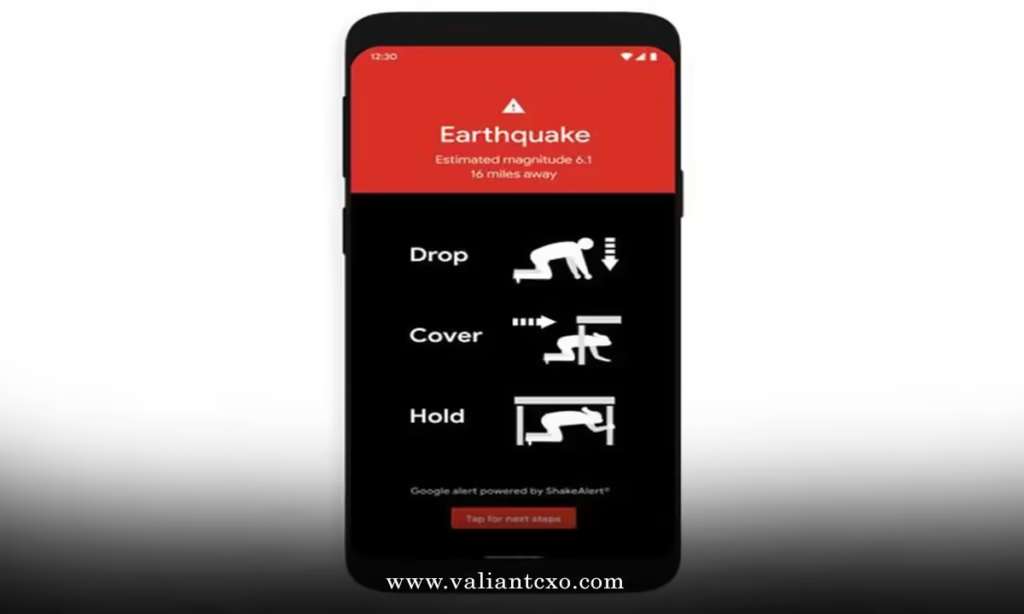
- The message might say something like “Expect light to strong shaking. Drop, Cover, Hold On.”
- You get seconds (sometimes more, sometimes barely any).
The metaphor I use with clients: it’s like a lightning app that tells you thunder is coming. You can’t stop the strike. But you can brace for the boom.
Step‑by‑Step Setup: Action Plan for Beginners
Here’s a clean, no‑nonsense setup to make the most of the best earthquake early warning app for android 2026 in the US.
1. Turn On Android Earthquake Alerts
- Open Settings on your Android.
- Tap Safety & emergency (or Location, depending on your version).
- Look for Earthquake alerts.
- Toggle it On.
- Make sure Location is enabled and set to at least “While using” for system services.
What usually happens is people assume this is on by default, but after a factory reset or OS update, it may quietly flip off. So verify it.
2. Check Wireless Emergency Alerts (WEA)
- In Settings, go to Notifications or Safety & emergency.
- Find Wireless emergency alerts.
- Make sure relevant categories (especially threat alerts) are enabled.
WEA is one of the ways ShakeAlert and emergency agencies can reach you.
3. Add at Least One Local or Partner App (If Available)
If your state or utility has an official early warning or emergency app, install it and:
- Allow critical alerts.
- Allow location access.
- Test notifications if the app offers a test mode.
This gives you redundancy: if Android’s system lags, the partner app may fire first (or vice versa).
4. Configure Sound and Do Not Disturb
A lot of people unintentionally sabotage the best earthquake early warning app for android 2026 by silencing it.
- In Do Not Disturb, allow priority or emergency notifications.
- Ensure Earthquake alerts / emergency alerts can override silent mode.
- Use a loud, distinct alert tone if you can customize it in the app.
5. Practice Your 5‑Second Response
An alert is useless if you freeze.
I’d recommend:
- Agree on a family rule: at any strong earthquake alert, everyone Drops, Covers, and Holds On immediately.
- Walk through scenarios:
- At home
- At work
- In bed
- In a store or school
The official Ready.gov earthquake safety guidance lays out best practices for personal safety and is worth reviewing so your reflexes are grounded in expert advice.
6. Review Annually
Phones change. OS updates roll out. People move.
Once a year:
- Re‑check Android Earthquake Alerts.
- Re‑check emergency alerts.
- Confirm any local apps are still supported and updated.
Think of it like changing smoke alarm batteries—low effort, big upside.
Common Mistakes & How to Fix Them
Even with the best earthquake early warning app for android 2026 installed, plenty of users accidentally kneecap their system. Here’s what goes wrong and how to fix it.
Mistake 1: Assuming One App Covers Everything
Problem:
People install one app, forget about Android’s built‑in alerts and carrier alerts, and assume they’re “done.”
Fix:
Treat this as a layered system:
- Android Earthquake Alerts = base layer
- WEA + ShakeAlert partner = second layer
- Local/regional apps = third layer
If one fails or lags, the others are still in play.
Mistake 2: Aggressive Battery Saving Kills Alerts
Problem:
Battery optimizers or aggressive power‑saving modes block background processes and notifications.
Fix:
- Go to Settings → Apps → [Your alert app] → Battery.
- Set it to Unrestricted or Don’t optimize.
- In Battery Saver, allow critical alerts to bypass restrictions if your phone supports that granularity.
Mistake 3: Location and Permissions Turned Off
Problem:
The system can’t tell whether you’re near the predicted shaking, so you don’t get an alert—or you get generic ones.
Fix:
- For Android Earthquake Alerts and local apps, ensure Location is enabled.
- Allow location permission when prompted.
- Verify that any “Allow only while using the app” choice still allows background emergency alerts (this varies by OS version, so re‑check after updates).
Mistake 4: Ignoring Test Alerts or Practice Drills
Problem:
When a real alert hits, you’re not sure what to do and waste precious seconds.
Fix:
- Treat test alerts like fire drills.
- Actually practice Drop, Cover, and Hold On when you get one.
- After drills, ask: Did everyone hear the alert? If not, debug device settings.
Mistake 5: Expecting Perfect Accuracy
Problem:
Users get annoyed by a “light” shaking alert for a quake that barely rattles their blinds and start disabling alerts.
Reality Check:
Early warning systems are tuned to err on the side of safety. You’ll occasionally get an alert for mild shaking.
Fix:
- Mentally anchor on this rule: I’d rather get one extra alert than miss the one that really matters.
- Adjust local app sensitivity if available, but avoid turning it down so far that you only hear about major quakes.
How to Choose the Best Setup for You
So out of all of this, what’s the best earthquake early warning app for android 2026 setup you should actually run in the US?
Ask yourself:
- Do I live in or often travel to CA/OR/WA?
- If yes: ShakeAlert + Android Earthquake Alerts are non‑negotiable.
- Am I okay with a couple alerts a year that end up being mild shaking?
- If yes: keep sensitivity higher—safer for you.
- Do I manage a team, building, or facility?
- Strongly consider aligning internal procedures with USGS ShakeAlert guidance and your local emergency management office so people respond consistently, not randomly.
What I’d Do If I Were You
If I lived anywhere in the US with earthquake risk (West Coast, Alaska, certain central/eastern fault zones), here’s exactly what I’d do:
- Enable Android Earthquake Alerts and confirm they’re working.
- Turn on Wireless Emergency Alerts with sound and vibration allowed to override silent.
- Install any official state or regional app recommended by my emergency management office or utility, and whitelist it from battery optimization.
- Run a 10‑minute family or office drill so everyone knows their move when phones go off.
- Review once a year—same day I test smoke alarms and check emergency kits.
You don’t control the quake. You control how prepared you are when the alert hits.
Key Takeaways
- The best earthquake early warning app for android 2026 in the USA isn’t one single app; it’s a stack built around ShakeAlert (where available) and Android Earthquake Alerts.
- USGS ShakeAlert is the official West Coast system; it feeds alerts through partner apps and wireless emergency alerts.
- Android Earthquake Alerts is your always‑on, phone‑based layer that works even outside classic West Coast coverage.
- To actually get alerts in time, you must enable notifications, location, and emergency alerts, and prevent battery optimization from killing them.
- Real protection comes from pairing alerts with trained reflexes: Drop, Cover, and Hold On as soon as your phone signals strong shaking.
- Expect occasional “over‑cautious” alerts; that’s the tradeoff for not missing a major event.
- Review your setup annually, especially after phone upgrades or OS updates, to keep the best earthquake early warning app for android 2026 functioning correctly.
- Think of the whole system like a layered seatbelt and airbag combo: you hope you never need it, but when you do, you’ll be glad you set it up properly.
FAQs: best earthquake early warning app for android 2026
1. Is the best earthquake early warning app for android 2026 free to use in the USA?
Yes. The core pieces of the best earthquake early warning app for android 2026 in the USA—ShakeAlert‑powered alerts, Android Earthquake Alerts, and Wireless Emergency Alerts—are free to end users. You might encounter paid apps with extra features (like logging or home automation), but for basic safety, you shouldn’t need to pay.
2. Will the best earthquake early warning app for android 2026 work if I have no data or Wi‑Fi?
It depends on the channel, but some alerts can still come through. Wireless Emergency Alerts from carriers can reach you without active data, as long as you have basic cellular signal. Android Earthquake Alerts may rely more on data, so for the best earthquake early warning app for android 2026 experience, assume you need at least intermittent connectivity for optimal performance.
3. How many seconds of warning can I expect from the best earthquake early warning app for android 2026?
There’s no fixed number. In some cases, you might get 10–30 seconds of warning if you’re far from the epicenter and near early‑detecting sensors; in other cases, especially if you’re close to the epicenter, you might get only a couple of seconds or even feel shaking first. The best earthquake early warning app for android 2026 can’t change physics—but it can turn whatever margin exists into usable time to protect yourself.