
Steam Deck review 2026 — four years into its life, Valve’s portable gaming powerhouse refuses to become yesterday’s news. That’s not something you can say about most gaming hardware. Most devices peak at launch and slowly fade. The Steam Deck? It keeps getting better. Consistent SteamOS updates, an ever-growing library of Verified titles, and a screen upgrade that genuinely changed the conversation.
Before you spend a dollar, here’s the quick picture:
- 🎮 What it is: A handheld PC gaming device running SteamOS 3, giving you access to your full Steam library in portable form
- 📺 The OLED difference: The LCD model is discontinued — only the Steam Deck OLED is sold in 2026, and the screen quality upgrade is real, not marketing noise
- ⚡ Battery life: 3–10+ hours depending on what you’re playing — best-in-class for gaming handhelds at this price
- 💵 Pricing in 2026: $549 (512GB) / $649 (1TB with anti-glare etched glass) — both prices have held steady despite component pressure
- 🚀 Who it’s for: Portable-first gamers who want a massive PC library without being chained to a desk
What’s Actually Available in 2026?
Let’s cut through the noise immediately. Valve discontinued the original LCD Steam Deck. It’s gone. Done. If you’re shopping new, you’re buying the Steam Deck OLED — and that’s not a downgrade, that’s a lucky break.
The OLED model launched in late 2023 and has been the only option through 2025 and into 2026. It ships in two configurations:
- 512GB model — $549, standard glass display
- 1TB model — $649, adds anti-glare etched glass coating
The etched glass matters more than most reviews admit. If you game outdoors, near windows, or under any kind of overhead lighting, the reduction in glare is legitimately transformative. It’s $100 well spent.
Steam Deck Review 2026: Full Specs Breakdown
| Spec | Steam Deck OLED (2026) |
|---|---|
| Display | 7.4″ OLED HDR, 1280×800, 90Hz, 16:10 aspect ratio |
| APU | Custom AMD Zen 2 — 4 cores/8 threads, up to 3.5 GHz |
| GPU | Custom AMD RDNA 2 — 8 CUs, up to 1.6 GHz |
| RAM | 16GB LPDDR5 |
| Storage | 512GB or 1TB NVMe SSD + microSD slot |
| Battery | 50Wh |
| Battery Life | 3–12 hours (game-dependent) |
| Wi-Fi | Wi-Fi 6E (2×2) |
| Bluetooth | 5.3 |
| USB-C | 3.2 Gen 2 — charging, display out, data |
| Display Out | Up to 4K@120Hz via USB-C dock |
| Charging | 45W fast charge supported |
| Weight | 640g |
| OS | SteamOS 3 (Arch Linux, KDE Plasma) |
The Screen: Finally Worth Talking About
Here’s the thing — the original LCD Steam Deck’s display was fine. It worked. It did its job. But the OLED? That’s a different conversation entirely.
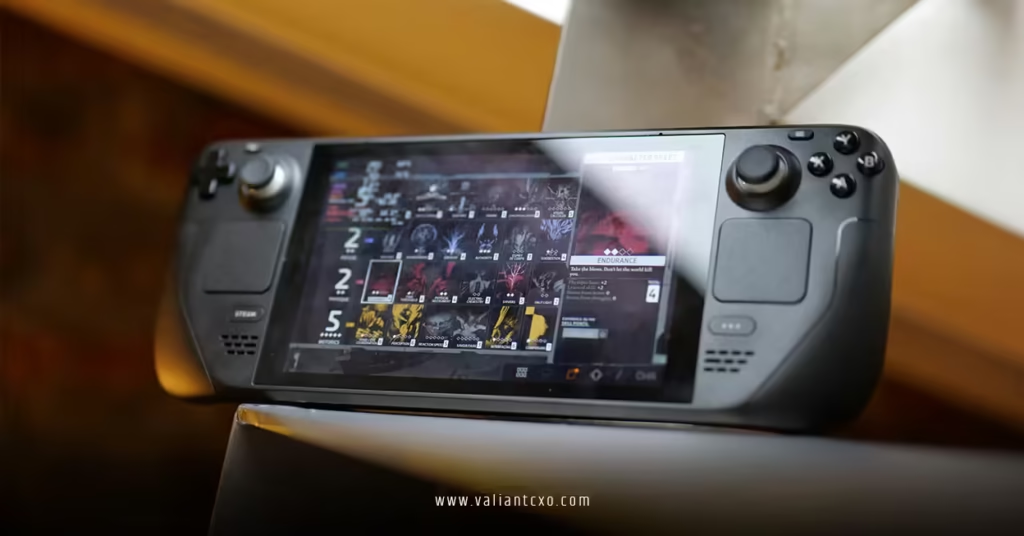
The 7.4-inch HDR OLED panel punches well above its price point. Colors are vivid, blacks are genuinely black, and HDR content looks the way HDR content is supposed to look — not the washed-out approximation you get on most budget displays. The 90Hz refresh rate feels smooth in motion-heavy games, and at 800p native resolution, you’re not stretching pixels across a giant screen. At 7.4 inches, 800p is sharp enough. You won’t notice the pixel count.
One real-world note: reviewers consistently rate this display among the best on any handheld PC, second only to the significantly pricier Lenovo Legion Go 2 in color and contrast performance. That’s strong company.
Performance Reality Check: What Games Actually Run Like in 2026
Let’s be direct about this. The Steam Deck OLED is using hardware that was designed in 2021. The APU is a custom Zen 2/RDNA 2 chip. By desktop PC standards, it’s genuinely behind the curve in 2026.
Does that mean it can’t run modern games? No. Does it mean expectations need calibration? Yes.
Here’s what real-world 2026 gaming looks like on the Steam Deck OLED:
| Game | Settings | FPS (Estimated) | Notes |
|---|---|---|---|
| Cyberpunk 2077 | Medium, FSR Balanced | 30–45 FPS | Optimized, runs well |
| Hogwarts Legacy | Medium-High | 50–67 FPS (indoor) / dips to 40s outdoor | Great overall |
| Black Myth: Wukong | Low, 800p, no frame gen | ~28–30 FPS avg | Demanding but playable |
| The Witcher 3 (Next Gen) | Max TDP | ~46 FPS avg | Solid performance |
| Forza Horizon 5 | Medium | 30–55 FPS | Not verified, runs great |
| God of War | Optimized settings | 45–60 FPS | Excellent experience |
| Indie/Retro/Emulation | Native | 60–90 FPS | Flawless — this is the sweet spot |
The pattern is clear. Demanding triple-A titles are playable, not effortless. Older AAA games, well-optimized titles, indie games, and emulation? The Steam Deck absolutely destroys expectations.
One 2026 wrinkle worth knowing: some competitive multiplayer games — certain sports titles, games with kernel-level anti-cheat — simply won’t run on Linux. Madden 26, for example, hits the incompatibility wall. Check the Deck’s compatibility rating before you buy a game you’re planning to play exclusively on this device.
SteamOS in 2026: The Quietly Impressive Story Nobody Tells
The operating system is doing more heavy lifting than the hardware in this equation. SteamOS 3 has been updated continuously, and the improvements are real and compounding.
SteamOS 3.7.8 — released in mid-2025 — added a Battery Charge Limit feature (capping charge at 80% to extend long-term battery health), improved third-party hardware support, and refined the background process management that keeps the system lean. That last part is why the Steam Deck runs games more efficiently than you’d expect from the APU alone.
Two community-driven tools have also changed the calculus in 2026:
- Decky Loader — a plugin framework that unlocks frame generation, FSR 4 emulation through INT8 scaling, and granular performance overlays. In my experience, this single tool meaningfully extends the device’s capability ceiling.
- Lossless Scaling — third-party frame interpolation that takes a 35 FPS game and pushes it to 70–80 FPS with reasonable visual fidelity. Resident Evil Village running at 35 base FPS and displayed at 79 FPS on an OLED screen is a legitimately impressive sight.
Here’s the quiet truth about SteamOS: it’s why the Steam Deck wins. Not the hardware. The OS keeps getting better, and every improvement applies to a device you already own.
Steam Deck Review 2026: Pros & Cons Side by Side
| ✅ What It Gets Right | ❌ Where It Falls Short |
|---|---|
| OLED display is genuinely exceptional | Zen 2/RDNA 2 hardware is showing its age |
| 3–12 hours battery life — class-leading | 800p resolution looks dated vs. competitors |
| SteamOS keeps improving for free | 90Hz — rivals are at 120Hz or higher |
| 50,000+ Steam library access | Some games blocked by Windows-only anti-cheat |
| Active community tools extend capability | Only one USB-C port — docking requires a hub |
| Emulation performance is excellent | No native 4K gaming — requires docked + upscaling |
| Etched glass option reduces glare meaningfully | Not the raw performance leader among 2026 handhelds |
| Battery Charge Limit extends long-term battery health | Stock storage fills up fast on AAA titles |
Battery Life: The Number That Actually Matters
Battery life is where the Steam Deck OLED genuinely separates itself from most of the field. The 50Wh battery — combined with SteamOS’s efficient resource management — delivers:
- Indie games / retro emulation / low-demand titles: 8–12 hours
- Mid-tier titles (Hogwarts Legacy, Witcher 3, God of War): 4–6 hours
- Demanding AAA titles (Cyberpunk, Black Myth): 2.5–3 hours
Those numbers are real. The 2.5–3 hour floor on demanding games sounds rough on paper, but in practice, most people don’t do 3-hour uninterrupted gaming sessions on a handheld. And for anything less demanding, the Steam Deck goes the distance.
Plus, the 45W fast charging means a half-hour charge break gets you a meaningful amount of playtime back. That’s a practical advantage that the raw watt-hour number doesn’t fully capture.
Step-by-Step: Getting Started With the Steam Deck (Beginner’s Guide)
New to handheld PC gaming? The learning curve is gentler than you think. Here’s how to hit the ground running:
- Set up your Steam account — Power on, connect to Wi-Fi, sign in. SteamOS drops you directly into Big Picture mode. It’s designed to feel like a console.
- Filter your library immediately — In your Steam library, filter by “Steam Deck Verified.” These are guaranteed-smooth experiences. Start there.
- Adjust TDP for battery control — Hit the ··· (Quick Access) button in-game. Under Performance, set a TDP limit (8–10W for most games). This dramatically extends battery life with minimal visual downside.
- Set frame rate targets, not maximums — Targeting 40 FPS at 40Hz (Steam Deck’s VRR sweet spot) is smoother than a stuttery 60. Start at 40 and push up if the game allows.
- Install Decky Loader — Go to desktop mode, open the browser, install from decky.xyz. This unlocks frame generation and FSR 4 emulation in minutes.
- Expand storage via microSD — Pick up a fast UHS-I or UHS-III microSD for indie games and older titles. Reserve the internal NVMe for demanding games that benefit from faster load speeds.
- Check ProtonDB before buying any unfamiliar game — ProtonDB.com shows real user reports on Linux compatibility. “Gold” or “Platinum” rating means you’re safe.
Common Beginner Mistakes — And How to Fix Them
Mistake 1: Running games at max settings out of the box Fix: The Steam Deck’s power envelope is fixed at ~15W max. Start at medium settings and let the Performance overlay (built into SteamOS) show you real-time FPS and GPU/CPU load before pushing further.
Mistake 2: Never touching the TDP limiter Fix: The TDP slider in Quick Access is your best friend. Dropping from 15W to 10W on a 40-FPS-locked game can nearly double battery life with zero visible difference in gameplay.
Mistake 3: Buying games without checking compatibility Fix: Anything rated “Unsupported” on ProtonDB or the Steam page may refuse to launch or crash frequently. “Verified” and “Playable” ratings are reliable. “Unknown” is a roll of the dice.
Mistake 4: Ignoring the microSD slot Fix: That slot is not optional on a 512GB model. A 512GB microSD runs around $30–50 and effectively doubles your library capacity. Get one before you need it.
Mistake 5: Expecting full 4K when docked Fix: Docked via USB-C hub, the Steam Deck can output to a TV or monitor — but the GPU isn’t built for native 4K gaming. Use FSR upscaling or target 1080p. It works well at that resolution.
How the Steam Deck Fits Into Valve’s 2026 Hardware Ecosystem
Here’s where it gets interesting. Valve didn’t launch the Steam Machine to replace the Steam Deck. They launched it to serve a completely different use case.
The Steam Deck is your couch, commute, and travel companion. The Valve Steam Machine review 2026 tells a different story — a stationary living room powerhouse with an estimated ~10.5–11.5 TFLOPS GPU throughput and more than 6× the raw performance of the Steam Deck. Think of it this way: the Steam Deck is the scout, and the Steam Machine is the siege cannon. Same SteamOS foundation, radically different jobs.
If you want portable gaming with full Steam library access, the Deck is your answer. If you want console-replacing living room performance with that same library? That’s the Steam Machine’s lane. Valve now has both ends covered, and the ecosystem benefits from that.
Who Should Buy the Steam Deck OLED in 2026?
Buy it if you:
- Want a portable gaming device with 50,000+ game access
- Value plug-and-play simplicity over tweaking
- Play a mix of modern, indie, and retro titles
- Travel frequently and want your full library on hand
- Already own a large Steam library
Skip it if you:
- Need to play Windows-only anti-cheat games on the go
- Require maximum raw performance at all costs
- Want 120Hz or 4K portable gaming (competitors exist at higher price points)
- Primarily play competitive shooters where 60+ FPS is non-negotiable
Key Takeaways
- 🏆 The Steam Deck OLED is the only model Valve sells in 2026 — and the OLED upgrade is genuinely worth it, not just a spec bump on paper
- 📺 The 7.4-inch HDR OLED display is among the best screens on any handheld gaming device at any price
- ⚡ Battery life of 3–12 hours is class-leading and outperforms most competitors at the same price bracket
- 🐧 SteamOS 3 keeps improving through free updates — SteamOS 3.7.8 added Battery Charge Limit and third-party device support
- 🔧 Community tools like Decky Loader and Lossless Scaling meaningfully extend what older hardware can do in 2026
- ⚠️ Zen 2/RDNA 2 hardware is aging — demanding 2026 AAA titles require compromises; this is not a 4K/60 machine
- 💡 Always check ProtonDB before purchasing unfamiliar games — anti-cheat incompatibility is a real limitation
- 🎮 For stationary living room gaming at full power, the Valve Steam Machine is the natural companion upgrade — same ecosystem, wildly different performance ceiling
The Steam Deck OLED in 2026 is a device that has outlasted its own hardware generation through software quality, ecosystem strength, and sheer usability. It’s not the most powerful handheld you can buy. It’s not trying to be.
What it is — consistently, reliably, and more than most competitors — is the best experience in handheld gaming. The library depth, the OS polish, the display quality, and the community around it make a compelling argument that raw TFLOPS aren’t the only thing that matters.
If you don’t own one yet, $549 is your entry point. Start with Verified titles, install Decky Loader on day two, and get a microSD card before your first big download. You’ll be fine.
Frequently Asked Questions
Q1: Is this Steam Deck review 2026 relevant if I owned the original LCD model — is upgrading worth it?
Yes, with a caveat. The OLED screen, larger battery, faster LPDDR5 memory, and improved thermals are all meaningful upgrades. If your LCD unit still works fine and you’re primarily gaming on less demanding titles, the upgrade isn’t urgent. But if you’re looking at the screen every session and feeling the battery limitation, the OLED is a substantial improvement, not a marginal one.
Q2: Can the Steam Deck play Epic Games Store or GOG titles in 2026?
Yes. Using the Heroic Games Launcher (installable through desktop mode), you can access your Epic and GOG libraries, and most titles run through Proton just like Steam games. It’s not the native plug-and-play experience you get with Steam titles, but it works reliably for Gold/Platinum-rated Proton titles. Check ProtonDB for specific game compatibility before purchasing.
Q3: How does the Steam Deck compare to the Valve Steam Machine announced for 2026?
They’re built for different roles. The Steam Deck is portable, battery-powered, and designed for gaming on the go. The Valve Steam Machine is a stationary small-form-factor PC with dramatically more power — estimated at ~10.5–11.5 TFLOPS GPU throughput versus the Deck’s roughly 1.6 TFLOPS. The Steam Machine is priced like a PC, not a console, and targets living room gaming. The Deck runs the same SteamOS 3 foundation, meaning your Verified game library carries across both platforms seamlessly.