
Valve Steam Machine review 2026 — this is the hardware story that PC gaming fans have been waiting a decade to tell. Valve’s first swing at a living room console-PC hybrid back in 2015 was, let’s be honest, a well-intentioned mess. Third-party manufacturers, inconsistent hardware, a fragmented experience. The whole thing quietly died. Now, Valve is back — but this time they built it themselves.
Here’s what you need to know upfront:
- 🎮 What it is: A compact, cube-shaped small-form-factor PC running SteamOS 3, designed for TV/living room gaming with your full Steam library
- ⚙️ Core hardware: Semi-custom AMD Zen 4 CPU (6-core/12-thread, up to 4.8 GHz) + semi-custom RDNA 3 GPU (28 CUs, 8GB GDDR6) + 16GB DDR5 RAM
- 🚀 Performance claim: Valve says it’s more than 6× more powerful than the Steam Deck
- 💡 Who it’s for: Gamers who want a console-simple experience with PC-level flexibility and access to a library of thousands
- 📅 Launch status: Announced November 2025; Valve confirmed a 2026 launch window (originally Q1, now targeted for first half of 2026 pending component pricing)
What Exactly Is the Valve Steam Machine Review 2026 Hardware?
Think of it like a gaming console that didn’t sign a deal with the devil. You’re not locked into a walled garden. You’re not forced into a subscription to get value. You own the hardware, you own your games, and you’ve got a legitimate PC operating under the hood.
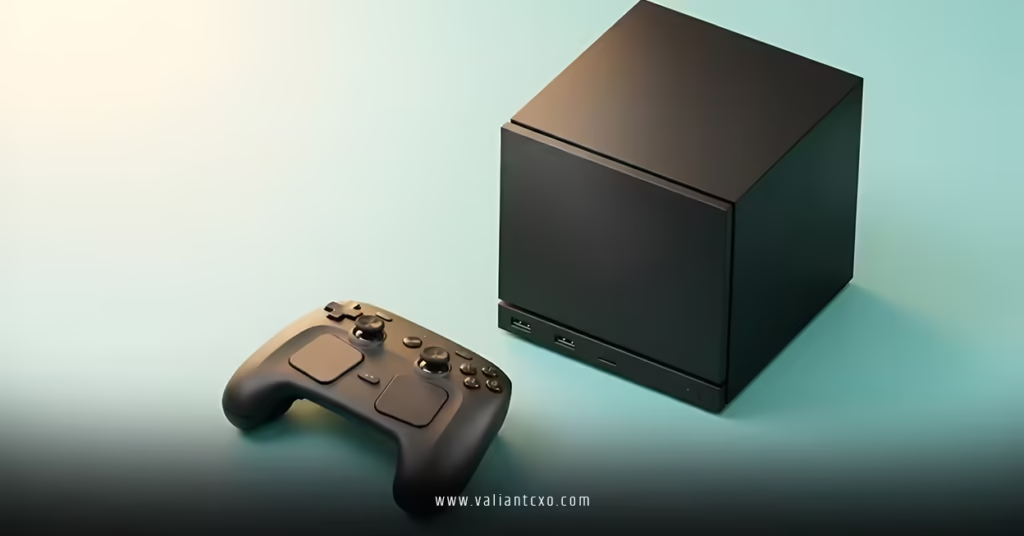
The physical unit is a black cube — 152 × 162 × 156 mm, 2.6 kg — with an RGB LED strip on the front and a beefy 120mm cooling fan drawing air through an internal power supply. No external power brick. No cable mess. That alone is a small win for anyone who’s ever tried to hide a gaming setup behind a TV.
Inside, Valve made deliberate choices based on the Steam Hardware Survey, designing around what their actual user base plays on rather than chasing spec-sheet bragging rights. The result is a machine tuned for 1080p and 1440p gaming with 4K on the table for optimized titles using AMD’s FSR upscaling.
Full Specs at a Glance
| Spec | Details |
|---|---|
| CPU | Semi-custom AMD Zen 4 — 6 cores / 12 threads, up to 4.8 GHz, 30W TDP |
| GPU | Semi-custom AMD RDNA 3 — 28 Compute Units, up to 2.45 GHz, 110W TDP |
| System RAM | 16GB DDR5 (SO-DIMM, user-replaceable) |
| VRAM | 8GB dedicated GDDR6 |
| Storage | 512GB or 2TB NVMe SSD + microSD slot |
| Wi-Fi | Wi-Fi 6E (2×2) |
| Bluetooth | 5.3 |
| Display Outputs | DisplayPort 1.4 (up to 4K@240Hz) + HDMI 2.0 (up to 4K@120Hz) |
| USB Ports | 2× USB-A 3.2 Gen 1 (front), 2× USB-A 2.0 + 1× USB-C 3.2 Gen 2 (back) |
| Networking | Gigabit Ethernet |
| OS | SteamOS 3 (Arch Linux base, KDE Plasma desktop) |
| Dimensions | 152 × 162 × 156 mm |
| Weight | 2.6 kg |
Pros & Cons: The Honest Breakdown
| ✅ Pros | ❌ Cons |
|---|---|
| Access to your full Steam library out of the box | HDMI 2.0 only — no HDMI 2.1 support |
| SteamOS is lean, fast, and console-simple | 8GB VRAM ceiling will hurt in future AAA titles |
| Proton compatibility layer runs most Windows games | Pricing “like a PC, not a console” (no hardware subsidy) |
| Storage is user-upgradeable (M.2 2230/2280) | Component pricing delays pushed launch beyond Q1 2026 |
| 6× the power of Steam Deck | UE5 titles at 4K will need significant FSR assistance |
| Built-in PSU — no external power brick | No Thunderbolt port |
| Estimated ~10.5–11.5 TFLOPS GPU throughput | No formal independent retail benchmarks yet at time of writing |
| New Steam Controller included at launch | Game compatibility still relies on Proton for non-native Linux titles |
How Does It Actually Perform? The Real Numbers
Raw specs are like a restaurant menu — they tell you what’s on offer, not whether the chef can cook. So let’s get practical.
Based on Valve’s architecture and early hardware analysis against comparable AMD silicon, independent estimates place the Steam Machine’s GPU throughput at approximately 10.5–11.5 TFLOPS — which, strikingly, edges past the PlayStation 5’s 10.28 TFLOPS despite the PS5 packing 36 compute units versus this machine’s 28. Higher clock speeds and RDNA 3’s architectural efficiency explain that gap.
What does that translate to in actual games?
- Cyberpunk 2077 (medium settings, FSR balanced, 4K): Estimated ~55 FPS average, ~44 FPS lows
- Ghost of Tsushima (FSR balanced, 4K): ~60 FPS average
- GTA V Enhanced (high settings, FSR, 4K): ~55–60 FPS
- Horizon Forbidden West (FSR balanced, 4K): Closer to 30 FPS — the engine is hungry
- Unreal Engine 5 titles (Stalker 2, etc.): 40–46 FPS at 4K, better at 1080p
The honest takeaway? 1080p and 1440p are the sweet spots. 4K is achievable on well-optimized titles with FSR doing the heavy lifting, but don’t walk in expecting locked 4K/60 on every demanding release. Valve says “the majority of Steam titles play great at 4K 60FPS” — that’s technically true with FSR engaged, but some games will push you down to 1080p internal resolution. That’s not a failure; it’s just physics.
Valve Steam Machine Review 2026: Who Should Actually Buy This?
Ask yourself one question: Do you want a gaming PC under your TV, or do you want to maintain a gaming PC?
Those are two very different things. The Steam Machine is built for the first crowd — people who want to press a button, have their games updated and ready, and never touch a driver update manually. It’s the console experience with the PC library. That’s genuinely powerful.
If you’re a tinkerer who loves building rigs, benchmarking, and maxing settings? Build a custom rig. Valve even makes that easy — you can install SteamOS on your own AMD hardware for free.
But if you’re buying for a living room setup, or you’re making the leap from console to PC gaming and don’t want to get lost in the weeds of Windows configuration, this machine was designed for exactly you.
Step-by-Step Guide for Beginners: Getting Started With the Steam Machine
New to PC gaming? No problem. The Steam Machine is intentionally approachable. Here’s how to get up and running fast:
- Set up the physical connection — Plug the machine into your TV or monitor via HDMI 2.0 or DisplayPort 1.4. Connect Ethernet if possible (Wi-Fi 6E works great too).
- Power on and complete the SteamOS setup — The system boots directly into Steam’s Big Picture mode. Sign in to your existing Steam account or create one for free.
- Check your library compatibility — In your Steam library, filter by “Steam Machine Verified” or “Steam Deck Verified” games first. These are guaranteed to run smoothly.
- Download your first game — Start with a Verified title. The machine will automatically pull the Linux-native version if one exists, or run it via Proton otherwise.
- Connect the Steam Controller — It pairs automatically via the integrated 2.4 GHz adapter. Gyroscopic controls, capacitive thumbsticks, haptic feedback — it’s meaningfully better than the original 2015 controller.
- Adjust display settings in-game — For demanding titles, start at 1080p or 1440p with FSR set to “Balanced.” You can push to 4K once you see how your specific games perform.
- Expand storage if needed — If 512GB fills up fast (it will), drop in an M.2 2280 NVMe drive. No proprietary tools required.
Common Mistakes Beginners Make — And How to Fix Them
Even a plug-and-play device has pitfalls. Avoid these:
Mistake 1: Expecting 4K/60 on every game at launch settings Fix: Enable FSR upscaling in-game, target 1080p or 1440p internal resolution, and let the machine upscale. The visual difference is smaller than the performance gain.
Mistake 2: Ignoring the “Proton” compatibility rating Fix: Before buying a game, check ProtonDB — a community-driven database that documents real-world Proton compatibility for thousands of titles. “Gold” and “Platinum” ratings mean you’re safe.
Mistake 3: Skipping the microSD slot Fix: Grab a fast microSD card (UHS-I or better) for older/less demanding titles. Keep your NVMe SSD for demanding games that benefit from faster load speeds.
Mistake 4: Assuming every Steam game runs perfectly Fix: Sort your library by “Verified” and “Playable” first. Games rated “Unknown” or “Unsupported” may need manual configuration or simply won’t work well on Linux.
Mistake 5: Buying only for 4K ambitions on a tight budget Fix: If 4K is a hard requirement without compromises, wait for benchmarks on specific titles you play. The machine handles it on many games — just not all.
SteamOS vs. Windows: Why the OS Actually Matters Here
Here’s the thing most people overlook — the operating system is half the story.
SteamOS 3 is built on Arch Linux with KDE Plasma. It’s lean. It doesn’t carry Windows’ background bloat, AI integration overhead, or memory-hungry processes. In practical terms, Valve’s SteamOS documentation shows the OS leaves significantly more system resources available for the game itself compared to an equivalent Windows 11 setup.
Some titles — like Cyberpunk 2077 — actually run better on Linux through Proton than they do natively on Windows. That sounds counterintuitive, but Proton’s translation layer has been in active development since 2018, and for AMD hardware specifically, the results are often competitive with or superior to Windows.
The kicker is the suspend/resume feature. Close a game, the machine enters modern standby. Open it back up — your game resumes exactly where you left. No full reboot. No 3-minute Windows update ambush. It behaves like a console.
Valve Steam Machine Review 2026: How It Stacks Up Against the Competition
| Steam Machine 2026 | PlayStation 5 | Xbox Series X | Mini PC (custom build) | |
|---|---|---|---|---|
| GPU TFLOPS (est.) | ~10.5–11.5 | 10.28 | 12.0 | Varies |
| Game Library | 50,000+ Steam titles | ~3,000 PS5 titles | Xbox/PC Game Pass | Unlimited |
| OS | SteamOS 3 (Linux) | PlayStation OS | Xbox OS | Windows 11 |
| Game Ownership | Yes — you own purchases | Yes | Mostly subscription | Yes |
| Upgradeable | Storage + RAM | No | No | Yes (fully) |
| Living Room Simplicity | Console-like | Native console | Native console | Requires setup |
| Price Model | PC pricing (no subsidy) | Hardware subsidized | Hardware subsidized | Varies |
Key Takeaways
- 🎯 The Steam Machine is a genuine second attempt — Valve built it themselves this time, and the hardware is meaningfully better for it
- 🔥 Estimated GPU throughput of ~10.5–11.5 TFLOPS edges past the PlayStation 5 on raw numbers
- 📺 The sweet spot is 1080p and 1440p gaming; 4K is possible with FSR but not universally guaranteed
- 🐧 SteamOS is a real advantage — lean, fast, console-simple, with a suspend/resume experience that shames Windows
- 🎮 Proton compatibility covers the vast majority of your Steam library; check ProtonDB before any niche title purchase
- 💾 Storage is user-upgradeable — that’s a meaningful long-term value differentiator over locked consoles
- ⚠️ Pricing is “PC-style” not “console-style” — no hardware subsidy, expect to pay closer to a mid-range gaming PC price
- 📅 Launch is confirmed for 2026; component pricing delays pushed it slightly past the original Q1 target
The Steam Machine has earned a genuine second look. It’s not perfect — the 8GB VRAM ceiling and HDMI 2.0 limit will age faster than Valve’s marketing team would like. But as a living room gaming device that gives you access to 50,000+ games, runs on an OS that respects your system resources, and delivers performance that competes with dedicated consoles? It’s the most compelling argument Valve has ever made for their hardware ambitions.
If you’re ready to step off the console treadmill without diving headfirst into a full PC build, the Steam Machine is genuinely worth your attention in 2026.
Frequently Asked Questions
Q1: In this Valve Steam Machine review 2026, does the machine actually support the full Steam library or just some games?
It supports any game that runs on SteamOS, which means native Linux titles plus the vast majority of Windows titles via Proton compatibility. Valve’s Deck Verified program already covers thousands of titles, and Steam Machine Verified extends that list further. For edge cases, checking ProtonDB gives you real-world community testing data.
Q2: Can I install Windows on the Steam Machine instead of SteamOS?
Yes — Valve confirmed the device is an open system, meaning you can install other operating systems including Windows. The RAM uses standard SO-DIMM slots and storage is M.2 upgradeable, making it more of an open PC platform than a closed console. Keep in mind that swapping to Windows removes the SteamOS performance and simplicity advantages that define the machine’s value.
Q3: How does the Steam Machine 2026 review compare to just buying a gaming laptop at a similar price?
The Steam Machine trades portability for a dedicated living room experience. A similarly-priced gaming laptop will likely deliver comparable or slightly better GPU performance in Windows, but without the integrated couch-gaming interface, suspend/resume functionality, or built-in Steam Controller integration. If your use case is TV gaming with a controller in a fixed location, the Steam Machine wins on experience. If you need to game on the go, a laptop wins on flexibility.